


Moon Phase Calendar
4.486.00 Reviews
App Specs
- Version
- 1.4.2
- Updated On
- License
- Free
- Downloads
- 1,000,000+
- Developer
- Coocent
- Categories
- Weather
- Platform
- Android, iOS
Screenshots
 Analysis by AppCompare
When I’m planning an evening outdoors, I often want a quick answer to a simple question: what will the moon look like, and when will it be above the horizon? Moon Phase Calendar is built around that kind of curiosity. It turns lunar timing into something I can check on my phone, whether I’m choosing a night for a walk, looking ahead to a full moon, or trying to make sense of what I see in the sky.
When a quick check depends on your connection
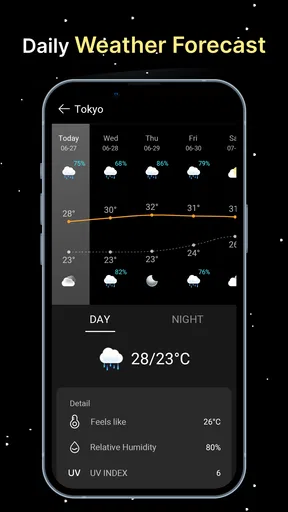
A lunar calendar is useful when it can answer a question at the moment it comes up. I might be deciding whether to bring a camera on an evening walk, or checking a date before making plans with friends. In those moments, the app’s calendar and moonrise and moonset information are more practical than a general weather forecast, which is usually designed around clouds, rain, and temperature rather than lunar timing.
Connectivity can shape how convenient that check feels. When the phone has a reliable connection, I can open the app and look up the details I need. If I’m in a remote area with patchy service, I would avoid making a last-minute plan that depends on being able to retrieve fresh information. A sensible approach is to check the date and location before leaving home, then treat the app as a planning reference rather than assuming it will be equally accessible everywhere.
This is especially useful for a camping trip or a countryside outing. I can compare the lunar calendar with the dates I’m considering before packing, then decide whether a bright moon or a darker sky suits the plan. That small bit of preparation is more dependable than waiting until I’m already away from a good connection to look everything up.
Using lunar details in everyday mobile settings
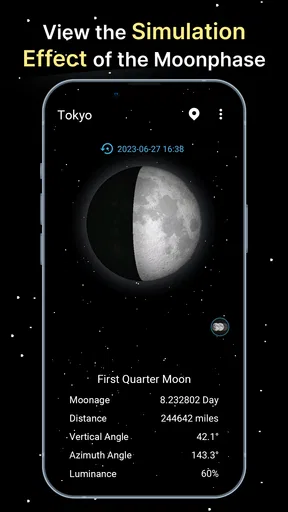
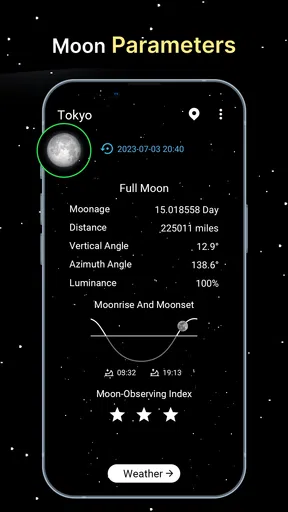
The app is most appealing to people who want more than a moon icon attached to a daily forecast. Coocent’s weather app is focused on lunar information, including an advanced calendar, moonrise and moonset, and a three-dimensional moon view. I find that combination makes it easier to move from a broad question—“What phase is it?”—to a more useful one: “When should I look, and what should I expect to see?”
For photography, I would use the calendar to choose a date first, then check the rise or set timing when planning where to be. The phase alone doesn’t guarantee a good shot: the local view, clouds, buildings, and timing all matter. Still, having the lunar schedule in one place can help narrow down an evening instead of relying on memory or spotting the moon by chance.
On a daily commute, a fast glance at the current phase may be all I need. At home, I can spend longer exploring the calendar or the 3D view. This makes the app better suited to occasional, purposeful checks than to someone who expects a full, constantly changing weather dashboard. I would keep a general forecast app for ordinary decisions about rain or temperature and use this one when the moon itself is the subject.
Worth Reading Before You Choose

EA SPORTS FC Mobile 26 Is a Bigger Football Game, but It Takes Time

Flipboard Shows What News Apps Must Do Beyond the Feed

Switching to Android Auto Means Rethinking Your Driving Routine

Google Calendar Makes a Crowded Week Easier to Manage

Ludo King Makes the Most of the Minutes Between Plans

Baby Panda World Brings Quick Play to Modern Phones, but Its Game Library Feels Busy
What to do when the app is inconvenient to reach
Any app can feel less useful when a phone is low on battery, a connection is unreliable, or there’s no time to navigate through several screens. For a time-sensitive outing, I’d check the relevant lunar date in advance and note the moonrise or moonset time alongside the location I plan to visit. That reduces the chance of needing to solve everything while walking or driving.
If a screen seems slow to load, I would first check whether the phone has a usable connection, then reopen the app and try again. I wouldn’t use a delayed screen as a reason to assume the moon’s timing has changed; instead, I’d verify the date and location and consult another trusted source if precision matters. For casual stargazing, a little uncertainty may be acceptable. For a carefully planned photo, it is worth checking ahead and leaving room for weather or local obstructions to spoil the view.
Location matters to the usefulness of rise and set times. Before relying on them, I’d make sure the selected location reflects where I’ll actually be, especially if I’m checking at home and then travelling somewhere far away. A calendar can tell me which phase falls on a date, but the best viewing time and horizon can differ with place. That is a practical distinction worth remembering when planning an outing.
Making sensible choices about data and attention
Because the app is centered on lunar details, I’d open it when I have a question rather than leave it running as a background companion. That keeps the experience focused and avoids turning a simple moon check into another stream of phone activity. If I’m trying to conserve battery during a long night outside, I can look up the timing before I leave and use the phone sparingly once I arrive.
The app is free, which makes it easy to try if moon phases are something you look up more than once in a while. It is rated for Everyone, and the current version is 1.4.2, with Android 7.0 as the minimum operating system requirement. Its 4.4 average from around 6,200 ratings and more than a million installs suggest that many people find it useful, though those figures don’t tell me whether it fits a particular person’s needs. Coocent is the developer behind it.
I would choose this over a standard weather app when I want a lunar calendar, moonrise and moonset, or a more visual look at the moon. I would choose a conventional forecast when the real question is whether it will rain, and a dedicated astronomy resource when I need a broader observing plan rather than a focused lunar reference. That division keeps expectations realistic: this is a moon-focused companion, not a replacement for every outdoor planning tool.
Getting to Know Moon Phase Calendar
The Moon Phase Calendar app is a neat little tool that provides detailed information about the moon's current phase, upcoming phases, and much more. It's available on both Android and iOS, making it super accessible for all the lunar enthusiasts out there. Once you dive into the app, you’ll find it’s not only about tracking lunar phases – it offers a plethora of features that can be both educational and practical.
Easy Navigation and User-Friendly Interface
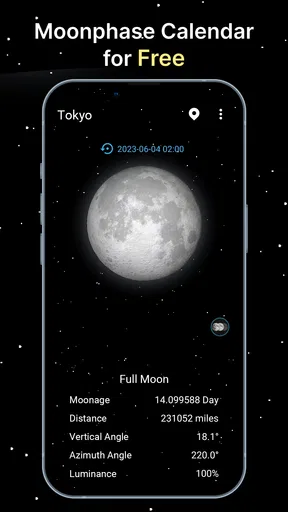
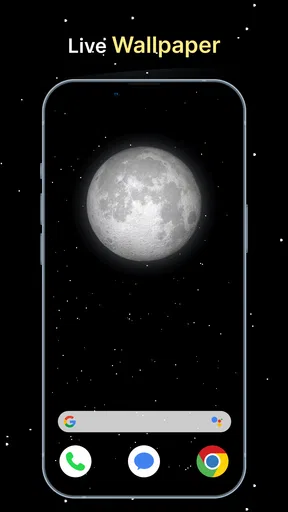
One of the first things you'll notice is how straightforward the app is to use. The interface is designed to be intuitive, so even if you’re not tech-savvy, you’ll find your way around with ease. The main screen displays the current moon phase, complete with a beautifully detailed image of the moon. It’s like having a piece of the night sky in your pocket.
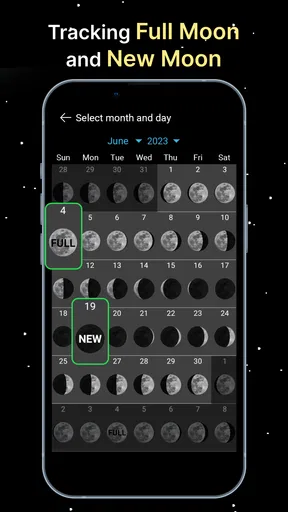
Swiping through the app, you can quickly access the calendar view, which shows the lunar phases for the entire month. This is particularly handy for planning events or simply satisfying your curiosity about what the moon will look like in the coming days.
Features That Shine
The Moon Phase Calendar isn’t just about pretty pictures and dates. It provides thorough information about the moon's rise and set times, its distance from Earth, and even its age. This data can be invaluable for photographers or anyone who enjoys stargazing.
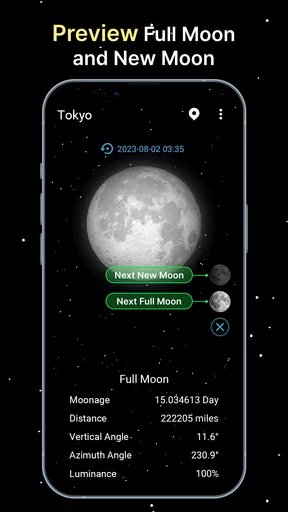
Another standout feature is the notifications. You can set reminders for significant moon phases like the full moon or new moon. This is a game-changer if you’re into astrology or just love celebrating the full moon with friends.
Customization and Personalization
What makes this app even more appealing is its customization options. You can choose how the information is displayed, whether you prefer a minimalistic view or a detailed one. The app allows you to set your location, which ensures the moon phase data is accurate for your specific area.
Moreover, the app’s aesthetics are customizable too. Whether you want a dark theme to match the night sky or a lighter one for daytime use, the app has got you covered. This level of personalization makes the app feel truly yours.
Educational and Fun
For those who love learning, the app includes a section dedicated to lunar facts and history. It’s a fun way to discover more about the moon and its influence on Earth. The information is presented in digestible bits, making it easy to impress your friends with fun lunar trivia.
Additionally, there’s a community aspect where users can share observations and photos. It’s like joining a club of moon enthusiasts, and who doesn’t love a sense of community?
Final Thoughts
Overall, the Moon Phase Calendar app is a fantastic companion for anyone interested in the moon and its cycles. Whether you’re a professional photographer, an astrology aficionado, or just someone who loves to look up at the night sky, the app offers something for everyone.
It combines functionality with beauty, providing a seamless user experience that keeps you coming back for more. So, next time you find yourself under the stars, pull out your phone, and let the Moon Phase Calendar app guide your gaze.
Pros
- Intuitive interface for easy navigation.
- Accurate moon phase predictions.
- Customizable alerts for events.
- Integration with other calendar apps.
- Detailed lunar data and descriptions.
Cons
- Limited free version features.
- Ads can be intrusive at times.
- Requires internet for updates.
- No widget support for home screen.
- Occasional sync issues reported.
FAQs for Moon Phase Calendar
What features does the Moon Phase Calendar app offer?
The Moon Phase Calendar app provides detailed information on the current moon phase, upcoming full moons, and new moons. Users can access a monthly calendar view, set notifications for specific moon phases, and even explore historical data. Additionally, many versions offer insights into lunar eclipses and personalized moon phase predictions based on your location.
Is the Moon Phase Calendar app accurate and reliable?
Yes, the Moon Phase Calendar app is designed to provide accurate and reliable lunar phase data. It uses precise astronomical calculations to ensure that users receive up-to-date information. The app's developers often update it to align with the latest scientific findings, ensuring its reliability for enthusiasts and professionals alike.
Can I customize notifications and alerts in the Moon Phase Calendar app?
Absolutely! The app allows users to customize notifications and alerts to suit their preferences. You can set reminders for specific moon phases, such as full moons or new moons, and adjust the timing of these alerts. This feature is particularly useful for those who follow lunar cycles for gardening, fishing, or spiritual practices.
Does the Moon Phase Calendar app require an internet connection?
The Moon Phase Calendar app generally functions offline, allowing you to access lunar data without an internet connection. However, some features, such as real-time updates or additional content, may require connectivity. It's best to check the specific app version's requirements to ensure it meets your needs for offline use.
Is the Moon Phase Calendar app suitable for all users?
Yes, the Moon Phase Calendar app is designed to be user-friendly and suitable for a wide range of users, from beginners to advanced lunar enthusiasts. It offers intuitive navigation and detailed guides to help users understand various lunar phenomena. Whether you're interested in astrology, gardening, or astronomy, the app provides valuable insights.


